
A focus app for Linux that is hard to get around
Focus builds a city.Giving in tears it down.
DeepWork slows distracting sites to a crawl at the network layer, starts focus sessions on a schedule, and raises a building in a 3D city for every session you finish. Quit early and you watch it come down.
Throttle, don’t block
Distracting sites crawl. Docs, mail and work sites run at full speed.
Routines start themselves
Focus slots begin on schedule. Two skips a week, no more.
A city that remembers
Finished sessions raise buildings. Giving in levels them.
Why
Slow beats blocked.
A block is a puzzle
A blocked site is a challenge, and anyone with sudo and a terminal can solve it in a minute. The urge wins, with a side of pride.
A crawl is just boring
At 256 kbit/s and 400 ms of extra latency, video buffers at 240p and images take half a minute. There is nothing to beat, just nothing worth the wait.
Losing hurts more than winning pleases
Every finished session is a building you watched go up. Quitting early means watching it fall, with your name on the rubble.
How it works
One session, end to end.
01Start
Set a timer or a stopwatch, or let a routine start one for you. The app only asks; the root daemon owns the session.
02Resolve
The daemon answers DNS itself. When a name matches your lists, its addresses go into nftables sets. SNI checks catch what DNS misses.
03Throttle
tc and netem add latency and cap bandwidth for those addresses only. Linger on a slowed site and the throttle tightens.
04Build
Finish and a building rises in your city. Surrender, tamper or tunnel out, and the city takes the damage.
31:42
deep · focus timer · 50 min
- docs.rust-lang.orgpassfull speed
- mail.google.compassfull speed
- music.youtube.compassallowed
- youtube.comslow256 kbit/s · +400 ms
- x.comslow256 kbit/s · +400 ms
- reddit.comblockreset
Tour
Every session, kept or quit.
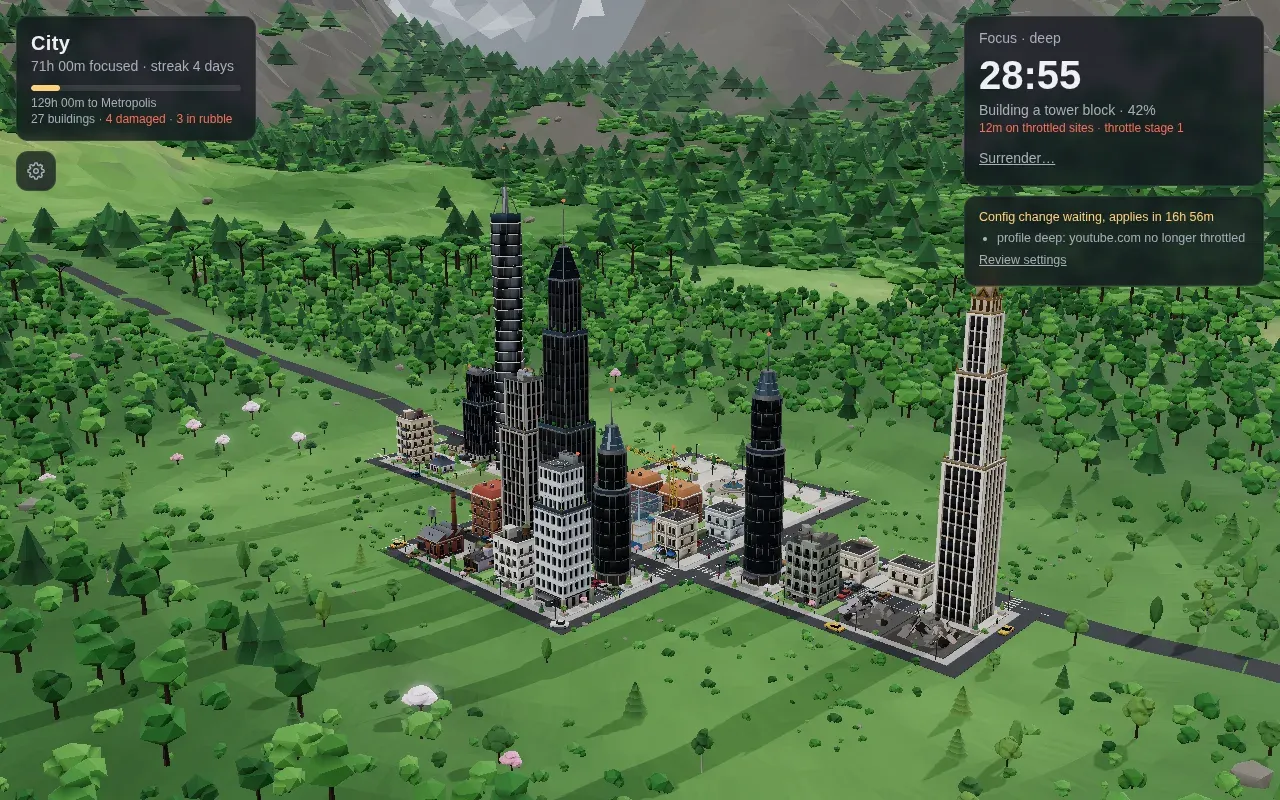
In session
A crane works the lot while you work. The card shows time left, the building’s progress and how long you spent on slowed sites.
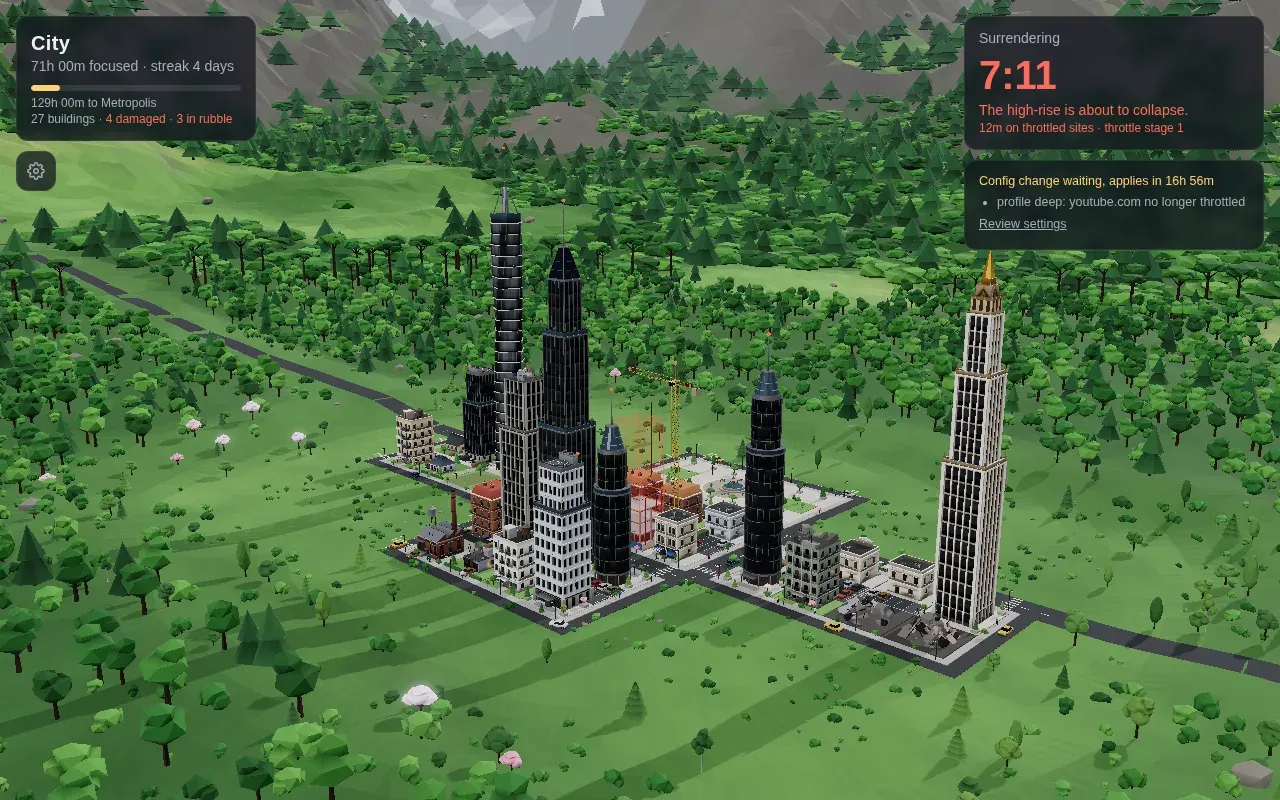
Surrender
Type the phrase by hand, then wait ten minutes with the throttle still on. The blueprint turns red and the site trembles.
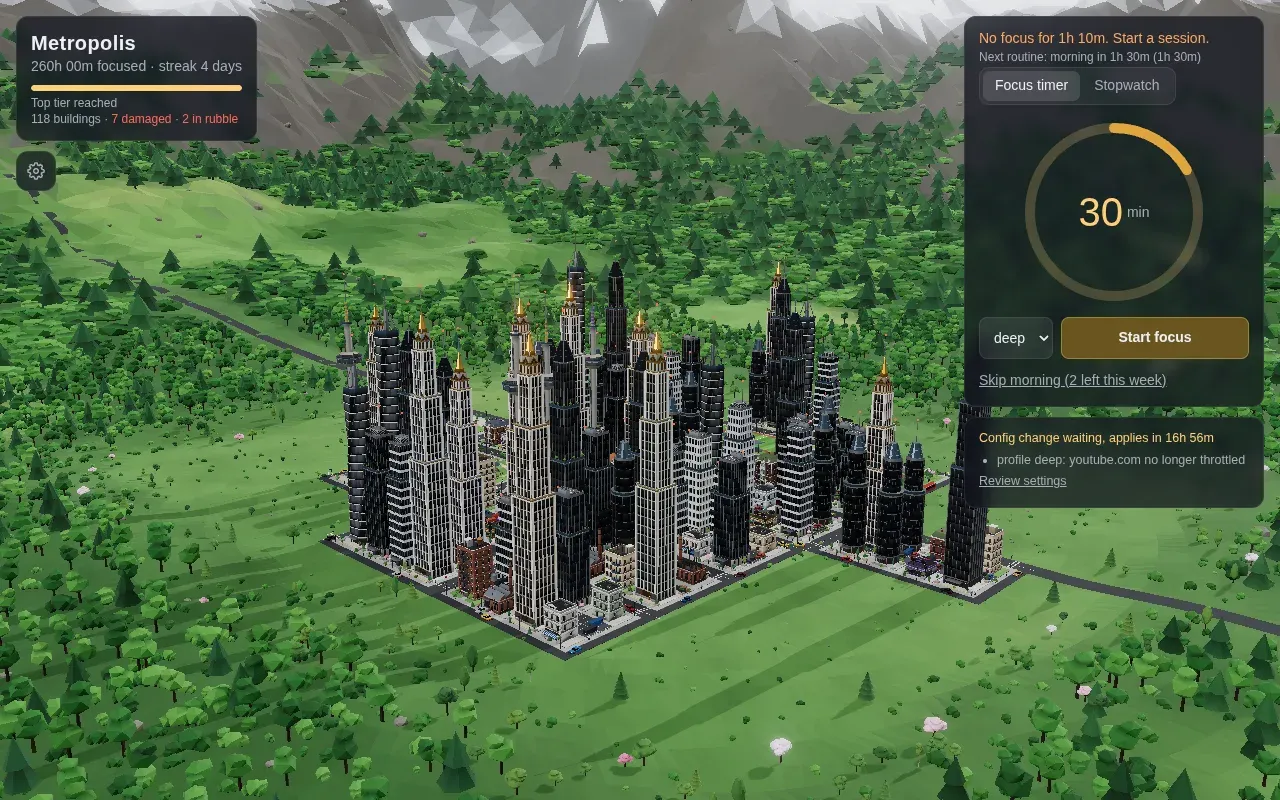
260 hours in
Hamlet, town, city, metropolis. Each tier is earned in focused hours, and the traffic grows with it.
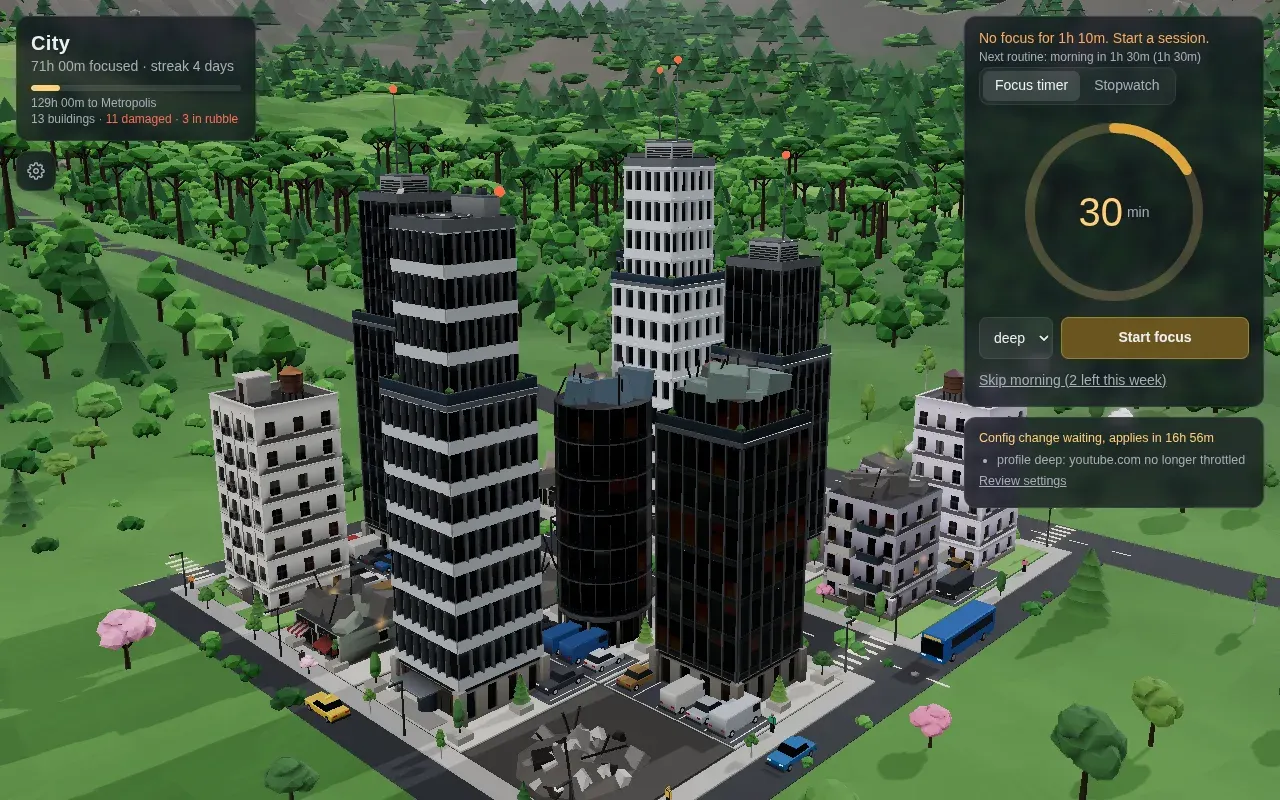
What giving in costs
Smashed windows, fire, rubble with rebar. Damage stays until finished sessions repair it.
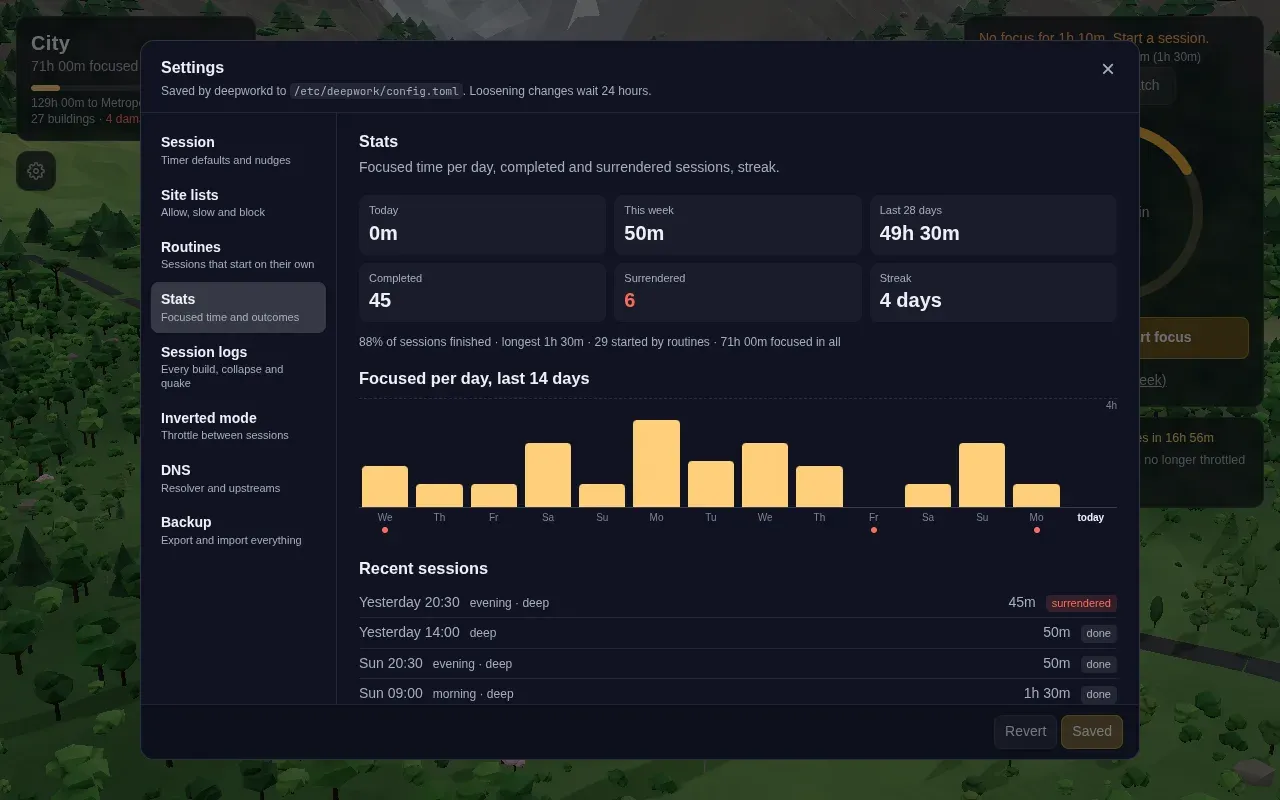
Stats
Focused time per day, streaks, and every session kept or quit. Surrenders get a red dot.
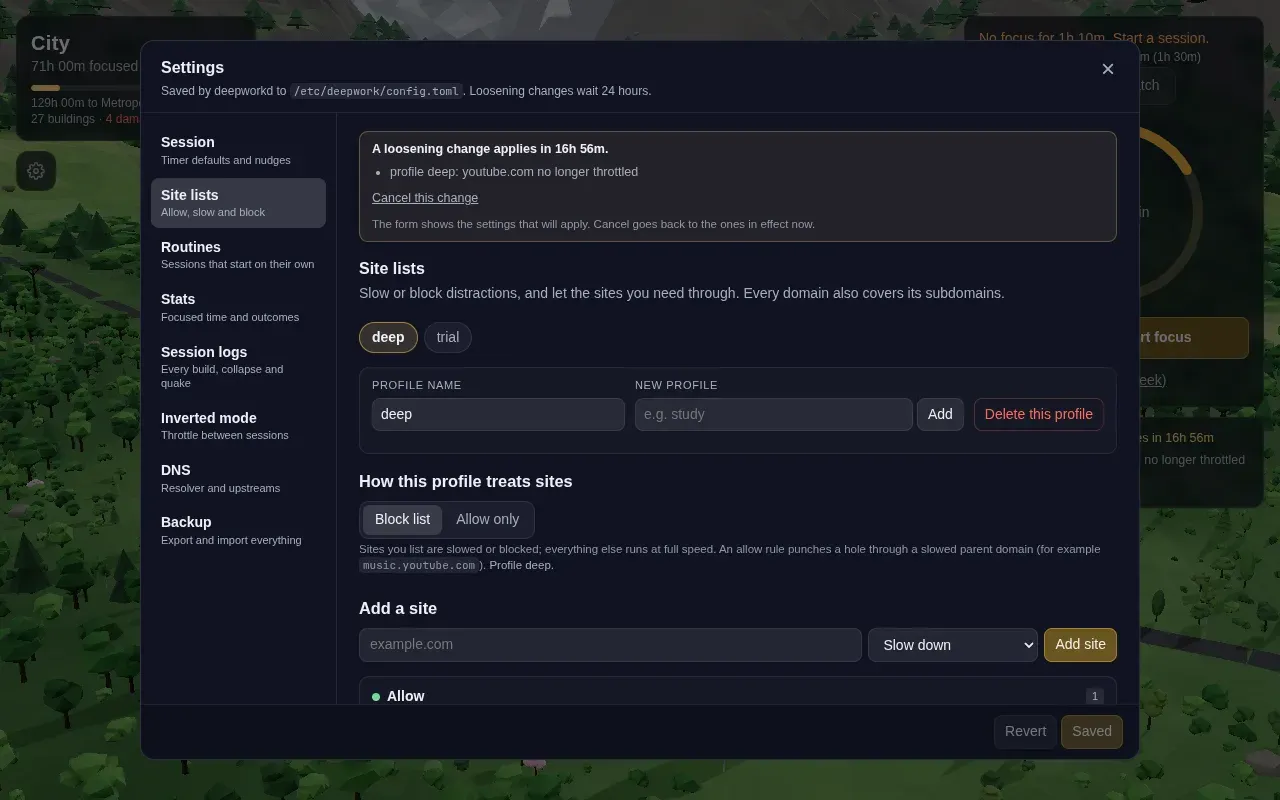
Site lists
Allow, slow or block per domain. Tightening applies at once; loosening waits 24 hours.
The city
Every session is a building.
Longer sessions build bigger
Focused hours grow the settlement
Hamlet
0 h
Town
10 h
City
50 h
Metropolis
200 h
Surrender
The building under construction collapses into rubble and fire spreads to the three nearest. The time doesn’t count and the streak resets.
Tamper
Flush the firewall or edit a qdisc and an earthquake hits your biggest district. The rules are back within a second anyway.
Bypass attempts
A refused sudo, a jump of the wall clock or a SOCKS tunnel cracks your newest building.
Coming back
Every finished session repairs damage, worst first, and builds on the oldest rubble. Twice as fast on a three-day streak.
The inspiration
Named after a book.
In Deep Work (2016), Cal Newport argues that the ability to focus without distraction is getting rarer at exactly the moment it’s getting more valuable, and that you don’t get it back by trying harder. You get it by building rituals and taking the alternatives off the table.
DeepWork is that advice with a root daemon behind it. Each of the book’s four rules maps to something the app does for you, so the decision is made once, calmly, and not again every time a tab beckons.
Rule #1
Work Deeply
Willpower runs out, so build rituals around depth, and keep a compelling scoreboard of the hours you put in.
→The city is the scoreboard
Every focused hour is on the skyline. You see your deep work instead of counting it.
Rule #2
Embrace Boredom
Don’t take breaks from distraction. Take breaks from focus, and decide in advance when they happen.
→Inverted mode
Distracting sites stay slow all day. Finished sessions earn free minutes you spend on purpose.
Rule #3
Quit Social Media
Keep a tool only if its benefits clearly outweigh its costs, judged with a clear head.
→Site lists with a cooling-off
Slow or block per domain. Loosening a list waits 24 hours, so the urge never gets the vote.
Rule #4
Drain the Shallows
Schedule every minute of your day, so deep work has a block of its own instead of the leftovers.
→Routines
Time blocks become sessions that start on their own. Skips are rationed to a few a week.
Read it if you haven’t: Deep Work on calnewport.com DeepWork is an independent project and isn’t affiliated with or endorsed by Cal Newport.
Hard to cheat
You have sudo.
It still isn’t worth it.
| You try | DeepWork |
|---|---|
Close the app, or kill the daemon | Rules stay in the kernel and the daemon restarts |
| Reboot, or suspend through a countdown | The session resumes; time only counts while the machine is awake |
| Wind the clock forward | Elapsed time never reads the wall clock |
dig @8.8.8.8, DNS-over-HTTPS, QUIC | Redirected to the daemon, dropped, or forced back to TCP |
| Hardcoded IPs, shared CDN addresses | SNI inspection judges each new TLS connection by name |
sudo nft flush ruleset | Repaired within a second, and an earthquake hits your city |
sudo, su, pkexec, systemctl stop | Refused until the session ends |
ssh -D, Tor, v2ray and friends | Spotted, and a building cracks every ten minutes it runs |
| Loosen the config | Waits 24 hours. Tightening applies at once |
Every countermeasure, with how it was tested: the threat model
Safety rails
A way out, never a lockout.
Six hours, then it ends
No session runs past six hours. The ceiling is in the code, not the config, so no setting can raise it.
Surrender is always there
Type a long phrase by hand (paste is refused) and wait ten minutes with the throttle on. Then the session ends, and it costs you.
The sudo lock fails open
If the daemon is down, hung or missing, the PAM gate lets you through. A bug can never lock you out of your own machine.
TTY root always works
Ctrl+Alt+F3 and a root login is the emergency exit, with every step to lift the rules written down.
DNS is yours outside sessions
Your resolver, strict DNS-over-TLS included, is only rerouted while a session runs. A crash can’t break name resolution.
Architecture
The window is only a view.
You · untrusted
deepwork-ui
The 3D city, the start card and every setting.
deepwork
The CLI: start, status, surrender, routines, world.
deepwork-agent
Notifications, heads-ups, nudges, and a bar module for Waybar or the Omarchy shell.
# deepworkd · root · Restart=always
Session engine
Countdown, stopwatch, surrender. Time accrues on the monotonic clock and survives reboots.
DNS forwarder
Plain or DNS-over-TLS upstreams. Matching answers fill the address sets.
Scheduler
Routines, skip tokens, nudges and the five-minute heads-up.
Tamper watch
Watches nft, tc and links; fingerprints the rules and repairs any change.
SNI inspector
Reads the TLS ClientHello from NFQUEUE and judges the connection by name.
Ledger
Sessions and penalties. The city is folded from it, never stored.
Kernel
nftables
table inet deepwork: address sets, marks, DNS redirect, QUIC and DoH drops.
tc + netem
Delay and a bandwidth cap for marked packets, egress and ingress via IFB.
NFQUEUE
New TLS connections queued once for an SNI verdict. Fails open.
Quick start
Two commands to your first building.
$ curl -fsSL https://deepwork.sagyamthapa.com.np/get.sh | sh
$ deepwork start 50m
- Debian, Ubuntu
.deb - Fedora, openSUSE
.rpm - Arch
pacman - Anything else
tarball
Read the script before you pipe it, or download a package from the latest release yourself.
What it needs
Linux with systemd: Debian 12+, Ubuntu 22.04+, Fedora, openSUSE or Arch, on x86_64 or ARM64. nftables and tc/netem. DNS-over-TLS keeps working.
Look before you install
cargo run -p deepworkd -- --dry-run logs every nft and tc command instead of running it.
Read the plan
The design, the threat model and how each countermeasure was tested.